Showing posts with label linux. Show all posts

Saturday, September 19, 2015

Adding new machine to rc files sync

Some time ago I wrote a post on linux productivity tools I use.
As from time to time I need to install new machine that would benefit from the synced rc files, I’ll document the steps required (as rediscovering it every time is rather a waste of time).

What I’d need

I’ll use the previously introduced:
* oh-my-zsh
* homeshick
* vim’s vundle plugin and
* tmux with tmuxinator
* powerline fonts

Please note: order is important here, otherwise some install steps might fail.

oh-my-zsh

Install via:

sh -c "$(curl -fsSL https://raw.github.com/robbyrussell/oh-my-zsh/master/tools/install.sh)"

homeshick

Install via:

git clone git://github.com/andsens/homeshick.git $HOME/.homesick/repos/homeshick

Get existing dotfiles via:

cd $HOME/.homesick/repos
$HOME/.homesick/repos/homeshick/bin/homeshick clone <your git repo>

For me, as I use the private bitbucket repo, I just had to add the ssh keys generated to bitbucket first:

  1. generate ssh key via (following https://help.github.com/articles/generating-ssh-keys/)
  2. go to repo on bitbucket via web browser
  3. add generated key at: Settings -> Deployment keys

And run the

cd $HOME/.homesick/repos
$HOME/.homesick/repos/homeshick/bin/homeshick clone git@bitbucket.org:typekpb/dotfiles.git

Make sure to let homeshick symlink all the dotfiles from the repo (you might want to back up those to be overwritten). You’ll be prompted for symlinking stuff.

vim’s vundle plugin

As a prerequisite you’d need (g)vim installed (install instructions would be distro specific).

Install vundle plugin via:

git clone https://github.com/VundleVim/Vundle.vim.git ~/.vim/bundle/Vundle.vim

Afterwards install all the vundle managed plugins via running in the vim:

:BundleInstall

tmuxinator

Make sure to install tmux and ruby first (probably from the distro packages available).

gem install tmuxinator

if it’s to be installed globally, use:

sudo gem install tmuxinator

powerline fonts

Following the official instructions:

cd /tmp
wget https://github.com/powerline/powerline/raw/develop/font/PowerlineSymbols.otf
wget https://github.com/powerline/powerline/raw/develop/font/10-powerline-symbols.conf
mkdir ~/.fonts
mv PowerlineSymbols.otf ~/.fonts/
fc-cache -vf ~/.fonts/
mkdir -p ~/.config/fontconfig/conf.d/
mv 10-powerline-symbols.conf ~/.config/fontconfig/conf.d/

after restart seems to work OK.

Done :)

Tuesday, January 6, 2015

Ubuntu 14.04 with HP Deskjet 930c

I’ve got old printer: HP Deskjet 930c. Following steps were necessary to use it with my Ubuntu 14.04:

  1. Printer: start + connect it via USB
  2. download HP drivers bundle called: HP Linux Imaging and Printing from: http://hplipopensource.com/hplip-web/gethplip.html
  3. install bundle via (answering couple yes/overwrite questions):
chmod +x hplip-3.14.10.run && ./hplip-3.14.10.run 

You should see your new printer afterwards.

Friday, October 24, 2014

Linux productivity tools for me

This is the stack/are the tools that keep me productive in my day to day programming experience on linux.

Well, first of all let me tell you, that this might not fit your needs , as I’m a full time java programmer so have OS choices open (still I won’t go to my java-related stuff here, to make infos general and possibly usable for non-java guys as well.).

Linux is my choice for quite some years already and this post won’t detail the reasons, rather will focus on tools/utilities that help me survive in this world.

Distro

Well, let’s start from the ground. I don’t have a clear winner here. In fact I run currently 3 different ones (didn’t count my router and phone here):

In fact the info present in this post won’t detail too much on the 3.rd one, as it’s a server that just runs. The only thing I need there is a ssh access and that’s pretty much it, so this post would be rather short for that one :)

The reasons for Fedora, and Ubuntu in my case are:

  • stability (well, let’s say things don’t crash that often for me),
  • packages for most of the SW I need available in repositories and
  • the software packages are not at some archaic versions.

Window manager

Well, the nice thing is that most common window managers are available across all the popular distros. My choice here is Xfce.

Well, I don’t hate others, this just fits my needs best:

  • no need for fancy effects for me as
  • speed is rather my preference.
  • still I need something that I would not fight with every day.

Project I’m keeping my eye on is: LXQt. Still waiting for a more stabilized release (0.8 was released recently, which says to be ready for production desktops, but I’d plan to give it a try with the next release as well as when I have some time to set it up).

Shell

I have 2 candidates here:

  • bash and
  • zsh.

bash I use for scripting. It’s been my choice for quite some time already and I don’t see a need for change any time soon. As I’m quite used to it and the most people/projects I share the scripts with are OK with that/have used it already.

zsh as my default shell. This is still the world I consider new to me (see my recent post on that).

Shell env sync

As I have multiple machines I’m working on, there are 2 essential projects in the area for me:

oh-my-zsh

Provides for my zsh:

  • nicely/systematically structured plugin approach,
  • autocompletition and
  • all sorts of aliases.

To document my use case a bit here, these are the plugins I have present in my .zshrc:

plugins=(git mvn glassfish yum colored-man vagrant z common-aliases gradle homeshick vim-interaction powerline tmuxinator tmux)

Please note: Some are not available officially, and in the time of writing are just present as pull request from me to the project. Namely:

Well, might sound like a self promotion, but feel free to check and provide feedback on these if you find them useful.

Homeshick

Lets me synchronize all my custom zsh plugins as well as .bashrc files over git repository.

The only requirements are:

  • git and bash on all the clients
  • and the git repo accessible from all my clients.

In my case, there are things I don’t want to expose to public, but have no problem to have it hosted in some private git repo. So bitbucket is my choice, as I have there private git repo for free for the purpose.

Shell sessions bootstrapping

There are 2 important projects for me here:

Tmux and tmuxinator enable me to have just one yaml formatted file for bootstrapping my terminals.

I preffer it to having multiple tabs open in some GUI terminal, as it:

  • bootstraps all my shells daily in a same/reproducible way,
  • provides me with the nice way on organizing these and
  • navigation between these works with keyboard only => switching between different tasks becomes after some time of usage just a routine.

So no more searching in countless cards/windows for particular task.

Shell productivity

I don’t want to list all the linux utils I use, as I guess I’d make list too long and too boring (even for me to write). So let’s just name some, that I consider worth it:

  • ack - powerful grep replacement (I might document in the separate blog post),
  • notify-send and
  • all sorts of aliases and zsh/bash functions, that would be too many to list here, moreover might be too specific and useless for others.

Notify-send

I blogged about notify-send already.

I use it for all the app-server (in my case Glassfish) lifecycle management operations (start/stop/restart domain) as well as deployment stuff.

As these:

  • take quite some time to finish and
  • might end up with errors,

I let it myself updated with notification having:

  • exit code
  • chunk of the last couple lines from the log file.

This is great, as I can work in parallel and it gets my attention, once the job is done.

Desktop app launcher

Without having an option for fast startup of my favourite programs I’d waste my time searching the icons or menus.

As Xfce doesn’t provide me with the powerful one, I use: Synapse.

File manager

Well, there are times when I play with files in the command line, but sometimes it just fits better to use some UI for the purpose.

My choice is Krusader. Well, the most stuff I need is available, namely:

  • file/folder manipulation,
  • file folder comparison and
  • file/folder contents search.

The only thing that bothers me is the fact that development is rather stalled in the project.

Still, viable alternative might be: Double commander, which seem to be even cross-platform and can use the total commander plugins (which used to be my choice on windows for the purpose).

Editor

I tried to live with Gedit and for simple note-taking it might be a good choice, however as I like to play with ruby these days, I tried to find something that would help more in the area.

(G)Vim

After searching I came to conclusion, that (G)Vim is quite popular in the Linux world.

Well, it’s worth to mention vim joke here, which expresses the feelings of many on this editor: Infinite Vim monkey theorem (see Infinite monkey theorem for explanation).

Still, I’ve seen:

  • many people favouring it,
  • it’s the first editor I remember to have available once logging in to my school linux account (OK no real argument, just sentiment),
  • it seemed to provide countless plugins for all sorts of stuff and
  • it’s incredibly powerful, as far as I’ve seen and learning it might pay back.

So I decided cca 2 years back to uninstall the editors I’ve been used to and force myself to use (G)Vim.

Great source of information was for me: vimcasts, which helped me a lot in the area.

Well, I plan to document my .vimrc setup in a separate post, as it could make this one way too long.

Files sync tool

Unison is my choice her. For more info on my use case, see this blog post.

Conclusion

Hope you find some inspiration here. And would be glad to hear from you guys about any I missed, but you could not live without.

Still, I can’t believe anyone read this far. As I guess I would not force myself to :).

Wednesday, June 25, 2014

Migrating from bash to zsh

These are my steps in migration from bash to zsh. I’m documenting these to keep the future reference for me (and possibly other readers as well).

Motivation?

Check out the Slideshare presentation: Why Zsh is Cooler than Your Shell

Current shell

to find out the current shell:

ps -p $$

it’s useful during migration to make sure the new shell is really in use.

Migration

Migration itself included (on my Fedora) reconfiguring:

oh-my-zsh

There exists users’ maintained collection of zsh customizations, that I found useful. Called: oh-my-zsh. (Please note the amazing Github’s - Star count. Once seeing that I didn’t doubt I’ll give it a try.)

For installation I just went for:

curl -L http://install.ohmyz.sh | sh

oh-my-zsh with powerline

I’m used to powerline everywhere ((g)vim/konsole/tmux/bash) already, so let’s keep it working in zsh as well.

I created file: ~/.oh-my-zsh/custom/powerline.zsh with contents:

. ~/.local/lib/python2.7/site-packages/powerline/bindings/zsh/powerline.zsh

Please note: You need to go for the actual location of powerline installation on your system.

and in the file: ~/.zshrc I had to comment out line:

# ZSH_THEME="robbyrussell"

otherwise oh-my-zsh theme seems to conflict with powerline one.

oh-my-zsh plugins

The real benefit of oh-my-zsh commes with plugins, so I went for those I find useful. Via changing the file: ~/.zshrc having:

plugins=(git mvn glassfish yum colored-man vagrant z common-aliases gradle)

oh-my-zsh custom stuff

As my ~/.bashrc held already quite some customizations, I migrated those to:

~/.oh-my-zsh/custom/*.zsh

Even this part was nice, as I could tidy up things a bit and omit unused stuff. Moreover I decided to create multiple *.zsh files (as these are auto-loaded) to achieve modularity.

Done

Honestly in the beginning, I had no clue how much I would enjoy my new shell.

Friday, June 13, 2014

Xfce: How to disable toolbar text in KDE apps

Recently I’ve experienced quite a funny situation. I use Krusader for file browsing that calls Kompare for file comparisons. However I was not able to copy changes from left to right (or vice versa) in the compared files, as I could not see all the toolbar buttons (these were too big). I didn’t even notice for quite some time, that there are others, not displayed on my screen.

But who needs text description in toolbars? Well, I don’t!

I remembered global setting from the Gnome world that it should be possible, so searched from the KDE equivalent.

Found it (in my Fedora + Xfce) in:

Xfce menu button -> Options (hope this one is right, as I have it as Einstellungen) -> KDE SystemOptions (for me KDE SystemEinstellungen) -> Style (Stil) -> Fine Tuning tab -> Toolbars section
where I just chose No Text in the both: Main toolbar text as well as in the Secondary toolbar text.

That did the job for me.

Thursday, June 12, 2014

Using Genius TVGo DVB-T03 on Fedora

My other laptop was not available and the start of Football WM 2014 was just less than 30 minutes away. Let’s see if I can watch it on my laptop with Fedora (16) with my Genius TVGo DVB-T03 device.

The most of the steps were inspired by fedora wiki: https://fedoraproject.org/wiki/DavidTimms/DVB

DVB-T required package

I installed dvb-apps package via:

sudo yum install dvb-apps

Afterwards checked the file list in package via:

rpm -q --fileprovide dvb-apps

which contained also:

/usr/bin/scandvb

(please note we’ll need this one later).

Firmware

I plugged in my dvb-t usb and seen after running dmesg:

[11140.318728] usb 2-1.2: new high-speed USB device number 6 using ehci-pci
[11140.397936] usb 2-1.2: New USB device found, idVendor=0458, idProduct=4012
[11140.397946] usb 2-1.2: New USB device strings: Mfr=1, Product=2, SerialNumber=0
[11140.397952] usb 2-1.2: Product: DVB-T 2
[11140.397956] usb 2-1.2: Manufacturer: Afatech
[11140.557325] usbcore: registered new interface driver dvb_usb_af9015
[11140.557753] usb 2-1.2: dvb_usb_v2: found a 'Genius TVGo DVB-T03' in cold state
[11140.557900] usb 2-1.2: dvb_usb_v2: Did not find the firmware file 'dvb-usb-af9015.fw'. Please see linux/Documentation/dvb/ for more details on firmware-problems. Status -2
[11140.557905] usb 2-1.2: dvb_usb_v2: 'Genius TVGo DVB-T03' error while loading driver (-2)

so searched a bit and found + downloaded rpm from: http://pkgs.org/fedora-centos-rhel-opensuse-mandriva/olea/dvb-usb-af9015-fw-4.95.0-1.noarch.rpm.html

Afterwards installed the downloaded firmware via:

sudo rpm -ivh dvb-usb-af9015-fw-4.95.0-1.noarch.rpm

And finally unplugged and plugged to usb again to see:

[11796.948500] usb 2-1.1: new high-speed USB device number 7 using ehci-pci
[11797.038703] usb 2-1.1: New USB device found, idVendor=0458, idProduct=4012
[11797.038714] usb 2-1.1: New USB device strings: Mfr=1, Product=2, SerialNumber=0
[11797.038720] usb 2-1.1: Product: DVB-T 2
[11797.038725] usb 2-1.1: Manufacturer: Afatech
[11797.041521] usb 2-1.1: dvb_usb_v2: found a 'Genius TVGo DVB-T03' in cold state
[11797.042331] usb 2-1.1: dvb_usb_v2: downloading firmware from file 'dvb-usb-af9015.fw'
[11797.119176] usb 2-1.1: dvb_usb_v2: found a 'Genius TVGo DVB-T03' in warm state
[11797.542424] usb 2-1.1: dvb_usb_v2: will pass the complete MPEG2 transport stream to the software demuxer
[11797.542542] DVB: registering new adapter (Genius TVGo DVB-T03)
[11797.575204] i2c i2c-7: af9013: firmware version 4.95.0.0
[11797.578207] usb 2-1.1: DVB: registering adapter 0 frontend 0 (Afatech AF9013)...
[11797.589973] tda18271 7-00c0: creating new instance
[11797.597341] TDA18271HD/C1 detected @ 7-00c0
[11797.802656] Registered IR keymap rc-empty
[11797.802848] input: Genius TVGo DVB-T03 as /devices/pci0000:00/0000:00:1d.0/usb2/2-1/2-1.1/rc/rc0/input12
[11797.803814] rc0: Genius TVGo DVB-T03 as /devices/pci0000:00/0000:00:1d.0/usb2/2-1/2-1.1/rc/rc0
[11797.803825] usb 2-1.1: dvb_usb_v2: schedule remote query interval to 500 msecs
[11797.803832] usb 2-1.1: dvb_usb_v2: 'Genius TVGo DVB-T03' successfully initialized and connected

so firmware seems to work now.

Generating channels.conf

Following command did the job for me (as I’m located in Bayern):

scandvb /usr/share/dvb/dvb-t/de-Bayern  > channels.conf

Enjoying the broadcasts

There is no me-tv (that I’m used to it from Ubuntu world), still, there is a vlc, that does the job for me quite well. Just running:

vlc channels.conf

made it and I could watch the game!

Sunday, October 20, 2013

How I left the output redirection to file.

If you feel with linux command line at home, there is often a situation you pipe command outputs. These enable us doing amazing things.

However there are times, when console is not the right place to examine the final output and your favourite editor could do much better job.
In the past I used to output to file and open afterwards, until,... I've noticed it's possible to pipe directly to editor.

Let's assume we're interested in reading tail output in our editor of choice.

Gedit

As my default editor used to be Gedit for quite some time, let's see it in action:
tail -f some.log | gedit
No surprise :), I guess. No extra arguments. Nice!

Morever gedit even provides me with the indicatior (displayed on the tab), that loading is in progress and automatically refreshes contents.

Gvim

I'm in process of transition to gvim usage. I've heard about it's power, never really had a chance to dive deep there. However after watching some vimcasts and reading couple reviews, I'm quite amazed. I'm still trying to memorize the keys for specific tasks (that should be just a question of time and frequency of usage of particular ones).

I made it already my primary editor (wherever I used to use Gedit before).

OK, let's see it in action:
tail -f some.log | gvim -R -
please note -R is not mandatory, but useful, as it indicates file beeing read only.

Kate

I'm not really a KDE guy (these days/years :), but this might be be still be useful for those using kate editor:
tail -f some.log | kate -i 

Bash integration

In the comments of the sites (commandlinefu), where I've found the solution for gvim was one more usecase that caught my attention. Having in the .bashrc following:
function gv() {
  $@ | gvim -R -
}
Enables me doing:
gv tail -f some.log
what makes things even more comfortable. Sure you could replace the function name, as well as the editor with the ones you prefer.

Well, that's it, enjoy (or forget it if you find it useless :) or if interested, share how you achieve it with your editor of choice.

Wednesday, September 4, 2013

Handling file rollover with tail monitoring

The most of us probably already know the command:
tail -f <your_file_to_monitor>
it's useful for monitoring whatever has been appended to the file called <your_file_to_monitor>.

OK, nothing new here (probably). I could not live without it any more I guess, once I got used to it (as it offers me all the power of linux shell - like piping the output to other command, etc.).

The common use case for me is monitoring of the log files created by various java logging frameworks (log4j/sl4j/whatever is used).

Log file rollover problem

Maybe you've noticed that this works, but from time to time, no more messages are printed. Why that happens? You need to restart it to have it running again.

The common problem is the usage of file rollover (for example if file exceeds particular size to be backed up named by specified pattern and logging continues to the empty file named the same as the original one). This is a good practice to prevent log file unlimited growing and keeping some history across application restarts.

But the nice guys doing tail considered this option obviously. If you check the man page it has some switches that can be used for the case. Here are the relevant ones:
--retry
      keep trying to open a file even if it is inaccessible when  tail
      starts  or if it becomes inaccessible later; useful when follow-
      ing by name, i.e., with --follow=name

-f, --follow[={name|descriptor}]
      output appended data as the file grows; -f, --follow, and --fol-
      low=descriptor are equivalent

-F     same as --follow=name --retry
So to have things running even despite of log file rollover, you should go for:
tail -F <your_file_to_monitor>
That's it. Easy right?

Thursday, August 22, 2013

Raspberry Pi driven Dropbox alternative

As mentioned earlier I bought Raspberry Pi. After some struggles with the board shipping I finally got it almost one month after my order. Components work as expected. I went for official Debian image installation.

Lately there has been quite some publicity about privacy and security on the the public services hosting data. So I decided to minimize the Dropbox usage for file sync and go for locally hosted solution. It doesn't mean I'm out of dropbox, but rather I use it only for things I need to share outside my LAN.

My synchronization requirements

  • two way sync
  • non-interactive sync
  • sync over ssh/local dirs (as pi works with ssh as a server out of the box)
  • support for star topology - PC1..n (laptops) <-> Server (Raspberry Pi)
  • keep additional dependencies to be installed on Raspberry low
  • enable sync within LAN only (as I have quite some restricted internet connection with respect to data transfer quotas)
  • operating on demand, rather than instantly (I want to use pi for other things as well and it's performance is not too impressive)

Alternative synchronization programs

I checked briefly only following:
  • rsync
  • Unison
    • quite well known,
    • but not actively developed any more, still patches seem to be applied from time to time.
  • ownCloud
    • looks actively developed
    • but compared to other 2 - eats more resources (on both sides, client and server)
To me, the unison looks like a winner. So I went for it.

Unison setup from scratch on Pi

I followed these steps:
  1. [on server] changed default raspberry password via:
    passwd
    
  2. [on clients and the server] set up password-less authentication for ssh connection (following the howtoforge tutorial)
  3. [on clients and the server] installed unison:
    • For Fedora:
      sudo yum install unison
      
    • For (X)ubuntu/Debian:
      sudo apt-get install unison
      
  4. [on clients] setup unison with ssh as a synch protocol (following the howtoforge tutorial) with the custom unison preferences file (see next section for reference).
That was basically it.

Custom setup

I created new unison preferences file:
~/.unison/unison.prf 
that has following contents:
# WATCH OUT: keep in sync across clients!

# dirs
root = /home/pb/unison
root = ssh://pi@192.168.2.109//media/My Book/pi/unison

# Work silently
batch = true

auto=true
times = true

# logging
log = true
logfile = /home/pb/.unison/unison.log

# Prevent deletion of all files if all files are locally deleted
confirmbigdeletes = true

# Check fast, don’t compare bit by bit
fastcheck = true # "the default on Unix systems", see docs

# ignore stuff
ignore = Name *~   ## ignores all files with ~ (gedit backup files)
Then I went for one more step. To synchronize via command line I issue following command on my client machines:
unison -ui text unison
To make my life easier, I created in:
~/.bashrc 
alias:
alias u-u="unison -ui text unison"
So that I can simply initiate the synchronization with:
u-u
That's it for my setup. Please note the paths as well as server IP should be adapted in case you'd be using it.

More info/inspiration

For more information, that I got inspired with, see:

Wednesday, August 14, 2013

tail: inotify resources exhausted

I've been facing issue with tail. Once executing:
tail -f <filename_to_tail>
I got error:
tail: die Inotify-Resourcen sind erschöpft
tail: Inotify kann nicht verwendet werden, es wird auf Pollen zurückgegriffen
For those of you having english locale, you'd see:
tail: inotify resources exhausted
tail: inotify cannot be used, reverting to polling
While looking around I've found following to be valuable in understanding the problem and solving it: So the error itself means that system is getting low on inotify watches, that enable programs to monitor file/dirs changes.

To see the currently set limit (including output on my machine), I executed:
cat /proc/sys/fs/inotify/max_user_watches
8192
Well, I had to decide about the limit. So I went for 1048576 (not sure why :) ). To set it I've found 2 solutions.

Temporary solution (not preserved across restarts)

As I'm used to sudo, I went for:
sudo echo 1048576 > /proc/sys/fs/inotify/max_user_watches
-bash: /proc/sys/fs/inotify/max_user_watches: Keine Berechtigung
OK, not working. Complaining about user rights on /proc/sys/fs/inotify/max_user_watches. Then based on: How do I use sudo to redirect output to a location I don't have permission to write to? I went for:
sudo sh -c 'echo 1048576 > /proc/sys/fs/inotify/max_user_watches'
which worked, as the command proofs:
cat /proc/sys/fs/inotify/max_user_watches
1048576
The problem is that the value is reset each time I rebooted.

Permanent solution (preserved across restarts)

Adding line:
fs.inotify.max_user_watches=1048576
to:
/etc/sysctl.conf
fixed the limit value permanently (even between restarts).

Deeper analysis

However if you're interested to investigate problem in deep, it would be good idea to find out who is using the resources. There seem to be an idea at unix.stackexchange: Who's consuming my inotify resources?.
for foo in /proc/*/fd/*; do readlink -f $foo; done | grep inotify | sort | uniq -c | sort -nr
However for me it didn't show any output I could analyse to dig deep.

On the other hand I convinced myself that Dropbox is guilty here. Even though I have no proof for that (just read on some of the sources where someone suspected the same service).

Friday, August 9, 2013

Setting up Vagrant on Fedora 17

Vagrant claims it can help in setup of virtual environments and make it easy to setup new guests.

However, to play around with that, I need to have Vagrant itself installed.

As I'm on Fedora 17, I went for this guide going through:
  • VirtualBox installation
  • Vagrant installation and sample usage

VirtualBox installation

[FAILED] Plan A (installing the RPMFusion package)


This was supposed to be be easy.
  • Searching for exact package name first
  • sudo yum list virtualbox
    
  • Installing afterwards
  • sudo yum install VirtualBox
    
After the 1.st expected problem (as documented by site I followed):
VBoxManage --version
WARNING: The vboxdrv kernel module is not loaded. Either there is no module
         available for the current kernel (3.9.10-100.fc17.x86_64) or it failed to
         load. Reboot the computer or load the kernel module by executing

           '/etc/sysconfig/modules/VirtualBox.modules' (as root)

         You will not be able to start VMs until this problem is fixed.
4.2.12_RPMFusionr84980
I was not able to resolve it as suggested, with (as I faced other errors):
sudo /etc/sysconfig/modules/VirtualBox.modules
[sudo] password for pb: 
ERROR: Module vboxdrv not found.
ERROR: Module vboxnetflt not found.
ERROR: Module vboxnetadp not found.
OK, well, time to look elsewhere. I found problem similar to my at virtualbox forum, with the reference, that I should go for the official rather than rpmfusion version of the VirtualBox.

As suggested, I did the removal and installation using:
sudo yum remove VirtualBox

[OK] Plan B (installing the official VirtualBox package)


For this one I've found guide here and it worked smoothly. I've decided not to copy paste information present elsewhere I'm reffering to, so feel free to follow the steps and get back here when done. Except that I didn't follow all the steps, but rather once comming to originally failed step:
$ sudo /etc/init.d/vboxdrv setup                                                                                        
[sudo] password for pb: 
Stopping VirtualBox kernel modules                         [  OK  ]
Uninstalling old VirtualBox DKMS kernel modules            [  OK  ]
Trying to register the VirtualBox kernel modules using DKMS[  OK  ]
Starting VirtualBox kernel modules                         [  OK  ]

$ VBoxManage --version
4.2.16r86992
I was done with that (didn't go for separate VirtualBox user setup).

Vagrant installation and sample usage


Let me reffer to original steps I followed, as the rest went smoothly for me.

Afterwards I could establish ssh connection to guest, simply via:
vagrant ssh
Enjoy.

Tuesday, August 6, 2013

Removing all the tables in the MySQL database

Recently I came into the problem, that I needed to clean up the MySQL database contents (to get rid of all the tables). Normally I'd go for the database drop and creation, but there are situations, where it's not feasible. The common case is that the user that has granted access to particular DB only. Can't create/recreate new one.

So I ended up (heavily inspired by some comments found here) with:
mysql -u <username> --password=<password> <database_name> -BNe "show tables" | awk '{print "drop table " $1 ";"}' | mysql -u <username> --password=<password> <database_name>
If you'd like to prevent having password stored in your shell history (and you're using file: .my.cnf to handle user/pass/database), you should go for much shorter one:
mysql -BNe "show tables" | awk '{print "drop table " $1 ";"}' | mysql
The switches explanation follows:
  • -B --batch - tab delimited output, one line per record / no history
  • -N --skip-column-names - do not write column names in results
As one of the users noted:

There is a very good reason to use show tables and not mysqldump. If you have a large database show tables will offer a superior performance.

Wednesday, June 26, 2013

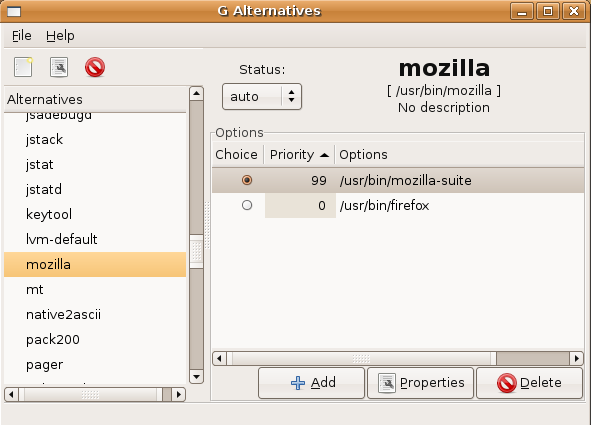
graphical UI for alternatives command on linux

Q: Do you need a UI for alternatives command?
A: Go for galternatives.

On linux is the alternatives command very powerful. Especially if you're in the world of java and need to live with multiple versions and possibly switch between them.

However I've found myself confused a bit by running the console commands.

While struggling with one of my issues I came across (http://forums.fedoraforum.org/showthread.php?t=241304) the UI for alternatives command called galternatives.

Installation


on Fedora was simple, as expected:
sudo yum install galternatives

Usage


Once you're familiar with alternatives concept and see the UI, there is not too much to explain any further I believe.

Making notify-send work on Fedora 17 + Xfce.

Q: Is not notify-send command working for you on Fedora 17 with Xfce?
A: You need to install required packages.

In my case:
sudo yum install xfce4-notifyd notification-daemon libnotify
did the job.

Where if you don't have xfce4-notifyd installed, command will execute without error, but no notification will be shown.

Now you can enjoy notifications like this one:
notify-send it\'s\ alive!
For inspirational sample messages, see: http://www.thegeekstuff.com/2010/12/ubuntu-notify-send/

Friday, May 3, 2013

Keyboard shortcut (Ctrl+Space) caught in Xfce

Q: Did you ever face the problem of keyboard shortcut Ctrl+Space not working in Xfce?

This will be another one of my keyboard shortcut troubleshooting posts when living daily in Xfce (previous one can be found here).

My primary IDE is Eclipse, therefor Ctrl+Space is something I need like a salt. While coding I use it for code completion intensively.

However some months ago it stopped working for me. Stackoverflow ideas didn't help. So I gave up. As one of my favorite songs says: "Never know what you got till it's gone".

But couple days ago, I've observed, when pushing this combination accidentally twice in a row I got keyboard switch dialog.

While looking around, I've found IBus applet in my xfce panel (not sure how it got there :) ). When going for it's options, I've found out that my favorite keyboard shortcut was eaten by that one. Changing it to whatever else, solved the code completion in Eclipse for me.

Wednesday, February 27, 2013

Xfce: changing standard global keyboard shortcuts

Q: Did you ever face the problem with Xfce not all of the globally defined keyboard shortcuts can be changed?

In my case Eclipse IDE shortcuts that I'm used to:
  • Perspective switch (Ctrl + F8)
  • Editor switch (Ctrl + F6)
  • ...
all of these were eaten by Xfce (as they're supposed to be used for some multi-workspace experience)
But hey! I don't use multiple workspaces! I'd rather like to use the full power of eclipse here.

Changing via UI 


But if you go over: Menu -> Settings -> Keyboad
There are not all the global shortcuts listed (at least those mentioned earlier are missing).

Looking for help


As I faced this problem already quite some time ago, I even participated in some discussions (like this on myeclipse related), and even submitted Xfce bug report.

Good old plain xml way 


But when I came back to this problem after some time, I've googled and found some references to file:
~/.config/xfce4/xfconf/xfce-perchannel-xml/xfce4-keyboard-shortcuts.xml

As I checked the contents, there seem to be even the shortcuts I'm facing the problem with.

I've seen there:
  <property name="xfwm4" type="empty">
    <property name="default" type="empty">
      <property name="&lt;Alt&gt;Insert" type="empty"/>
      <property name="Escape" type="empty"/>
      <property name="Left" type="empty"/>
      <property name="Right" type="empty"/>
      <property name="Up" type="empty"/>
      <property name="Down" type="empty"/>
      <property name="&lt;Alt&gt;Tab" type="empty"/>
      <property name="&lt;Alt&gt;&lt;Shift&gt;Tab" type="empty"/>
      <property name="&lt;Alt&gt;Delete" type="empty"/>
      <property name="&lt;Control&gt;&lt;Alt&gt;Down" type="empty"/>
      <property name="&lt;Control&gt;&lt;Alt&gt;Left" type="empty"/>
      <property name="&lt;Shift&gt;&lt;Alt&gt;Page_Down" type="empty"/>
      <property name="&lt;Alt&gt;F4" type="empty"/>
      <property name="&lt;Alt&gt;F6" type="empty"/>
      <property name="&lt;Alt&gt;F7" type="empty"/>
      <property name="&lt;Alt&gt;F8" type="empty"/>
      <property name="&lt;Alt&gt;F9" type="empty"/>
      <property name="&lt;Alt&gt;F10" type="empty"/>
      <property name="&lt;Alt&gt;F11" type="empty"/>
      <property name="&lt;Alt&gt;F12" type="empty"/>
      <property name="&lt;Control&gt;&lt;Shift&gt;&lt;Alt&gt;Left" type="empty"/>
      <property name="&lt;Alt&gt;&lt;Control&gt;End" type="empty"/>
      <property name="&lt;Alt&gt;&lt;Control&gt;Home" type="empty"/>
      <property name="&lt;Control&gt;&lt;Shift&gt;&lt;Alt&gt;Right" type="empty"/>
      <property name="&lt;Control&gt;&lt;Shift&gt;&lt;Alt&gt;Up" type="empty"/>
      <property name="&lt;Alt&gt;&lt;Control&gt;KP_1" type="empty"/>
      <property name="&lt;Alt&gt;&lt;Control&gt;KP_2" type="empty"/>
      <property name="&lt;Alt&gt;&lt;Control&gt;KP_3" type="empty"/>
      <property name="&lt;Alt&gt;&lt;Control&gt;KP_4" type="empty"/>
      <property name="&lt;Alt&gt;&lt;Control&gt;KP_5" type="empty"/>
      <property name="&lt;Alt&gt;&lt;Control&gt;KP_6" type="empty"/>
      <property name="&lt;Alt&gt;&lt;Control&gt;KP_7" type="empty"/>
      <property name="&lt;Alt&gt;&lt;Control&gt;KP_8" type="empty"/>
      <property name="&lt;Alt&gt;&lt;Control&gt;KP_9" type="empty"/>
      <property name="&lt;Alt&gt;space" type="empty"/>
      <property name="&lt;Shift&gt;&lt;Alt&gt;Page_Up" type="empty"/>
      <property name="&lt;Control&gt;&lt;Alt&gt;Right" type="empty"/>
      <property name="&lt;Control&gt;&lt;Alt&gt;d" type="empty"/>
      <property name="&lt;Control&gt;&lt;Alt&gt;Up" type="empty"/>
      <property name="&lt;Super&gt;Tab" type="empty"/>
      <property name="&lt;Control&gt;F1" type="empty"/>
      <property name="&lt;Control&gt;F2" type="empty"/>
      <property name="&lt;Control&gt;F3" type="empty"/>
      <property name="&lt;Control&gt;F4" type="empty"/>
      <property name="&lt;Control&gt;F5" type="empty"/>
      <property name="&lt;Control&gt;F6" type="empty"/>
      <property name="&lt;Control&gt;F7" type="empty"/>
      <property name="&lt;Control&gt;F8" type="empty"/>
      <property name="&lt;Control&gt;F9" type="empty"/>
      <property name="&lt;Control&gt;F10" type="empty"/>
      <property name="&lt;Control&gt;F11" type="empty"/>
      <property name="&lt;Control&gt;F12" type="empty"/>
    </property>
    <property name="custom" type="empty">
      <property name="&lt;Control&gt;F3" type="string" value="workspace_3_key"/>
      <property name="&lt;Control&gt;F4" type="string" value="workspace_4_key"/>
      <property name="&lt;Control&gt;F5" type="string" value="workspace_5_key"/>
      <property name="&lt;Control&gt;F6" type="string" value="workspace_6_key"/>
      <property name="&lt;Control&gt;F7" type="string" value="workspace_7_key"/>
      <property name="&lt;Control&gt;F8" type="string" value="workspace_8_key"/>
      <property name="&lt;Control&gt;F9" type="string" value="workspace_9_key"/>
      <property name="&lt;Alt&gt;Tab" type="string" value="cycle_windows_key"/>
      <property name="&lt;Control&gt;&lt;Alt&gt;Right" type="string" value="right_workspace_key"/>
      <property name="Left" type="string" value="left_key"/>
      <property name="&lt;Control&gt;&lt;Alt&gt;d" type="string" value="show_desktop_key"/>
      <property name="&lt;Control&gt;&lt;Shift&gt;&lt;Alt&gt;Left" type="string" value="move_window_left_key"/>
      <property name="&lt;Control&gt;&lt;Shift&gt;&lt;Alt&gt;Right" type="string" value="move_window_right_key"/>
      <property name="Up" type="string" value="up_key"/>
      <property name="&lt;Alt&gt;F4" type="string" value="close_window_key"/>
      <property name="&lt;Alt&gt;F6" type="string" value="stick_window_key"/>
      <property name="&lt;Control&gt;&lt;Alt&gt;Down" type="string" value="down_workspace_key"/>
      <property name="&lt;Alt&gt;F7" type="string" value="move_window_key"/>
      <property name="&lt;Alt&gt;F9" type="string" value="hide_window_key"/>
      <property name="&lt;Alt&gt;F11" type="string" value="fullscreen_key"/>
      <property name="&lt;Alt&gt;F8" type="string" value="resize_window_key"/>
      <property name="&lt;Super&gt;Tab" type="string" value="switch_window_key"/>
      <property name="Escape" type="string" value="cancel_key"/>
      <property name="&lt;Alt&gt;&lt;Control&gt;KP_1" type="string" value="move_window_workspace_1_key"/>
      <property name="&lt;Alt&gt;&lt;Control&gt;KP_2" type="string" value="move_window_workspace_2_key"/>
      <property name="&lt;Alt&gt;&lt;Control&gt;KP_3" type="string" value="move_window_workspace_3_key"/>
      <property name="&lt;Alt&gt;&lt;Control&gt;KP_4" type="string" value="move_window_workspace_4_key"/>
      <property name="&lt;Alt&gt;&lt;Control&gt;KP_5" type="string" value="move_window_workspace_5_key"/>
      <property name="&lt;Alt&gt;&lt;Control&gt;KP_6" type="string" value="move_window_workspace_6_key"/>
      <property name="Down" type="string" value="down_key"/>
      <property name="&lt;Control&gt;&lt;Shift&gt;&lt;Alt&gt;Up" type="string" value="move_window_up_key"/>
      <property name="&lt;Shift&gt;&lt;Alt&gt;Page_Down" type="string" value="lower_window_key"/>
      <property name="&lt;Alt&gt;F12" type="string" value="above_key"/>
      <property name="&lt;Alt&gt;&lt;Control&gt;KP_8" type="string" value="move_window_workspace_8_key"/>
      <property name="&lt;Alt&gt;&lt;Control&gt;KP_9" type="string" value="move_window_workspace_9_key"/>
      <property name="Right" type="string" value="right_key"/>
      <property name="&lt;Alt&gt;F10" type="string" value="maximize_window_key"/>
      <property name="&lt;Control&gt;&lt;Alt&gt;Up" type="string" value="up_workspace_key"/>
      <property name="&lt;Control&gt;F10" type="string" value="workspace_10_key"/>
      <property name="&lt;Alt&gt;&lt;Control&gt;KP_7" type="string" value="move_window_workspace_7_key"/>
      <property name="&lt;Alt&gt;&lt;Control&gt;End" type="string" value="move_window_next_workspace_key"/>
      <property name="&lt;Alt&gt;Delete" type="string" value="del_workspace_key"/>
      <property name="&lt;Control&gt;&lt;Alt&gt;Left" type="string" value="left_workspace_key"/>
      <property name="&lt;Control&gt;F12" type="string" value="workspace_12_key"/>
      <property name="&lt;Alt&gt;space" type="string" value="popup_menu_key"/>
      <property name="&lt;Alt&gt;&lt;Shift&gt;Tab" type="string" value="cycle_reverse_windows_key"/>
      <property name="&lt;Shift&gt;&lt;Alt&gt;Page_Up" type="string" value="raise_window_key"/>
      <property name="&lt;Alt&gt;Insert" type="string" value="add_workspace_key"/>
      <property name="&lt;Alt&gt;&lt;Control&gt;Home" type="string" value="move_window_prev_workspace_key"/>
      <property name="&lt;Control&gt;F2" type="string" value="workspace_2_key"/>
      <property name="&lt;Control&gt;F1" type="string" value="workspace_1_key"/>
      <property name="&lt;Control&gt;F11" type="string" value="workspace_11_key"/>
      <property name="override" type="bool" value="true"/>
    </property>
  </property>

That sounds promissing! Let's remove multi-workspace relevant and see if that helps.

After my update:
  <property name="xfwm4" type="empty">
    <property name="default" type="empty">
      <property name="&lt;Alt&gt;Insert" type="empty"/>
      <property name="Escape" type="empty"/>
      <property name="Left" type="empty"/>
      <property name="Right" type="empty"/>
      <property name="Up" type="empty"/>
      <property name="Down" type="empty"/>
      <property name="&lt;Alt&gt;Tab" type="empty"/>
      <property name="&lt;Alt&gt;&lt;Shift&gt;Tab" type="empty"/>
      <property name="&lt;Alt&gt;Delete" type="empty"/>
<!--
      <property name="&lt;Control&gt;&lt;Alt&gt;Down" type="empty"/>
      <property name="&lt;Control&gt;&lt;Alt&gt;Left" type="empty"/>
-->
      <property name="&lt;Shift&gt;&lt;Alt&gt;Page_Down" type="empty"/>
      <property name="&lt;Alt&gt;F4" type="empty"/>
      <property name="&lt;Alt&gt;F6" type="empty"/>
      <property name="&lt;Alt&gt;F7" type="empty"/>
      <property name="&lt;Alt&gt;F8" type="empty"/>
      <property name="&lt;Alt&gt;F9" type="empty"/>
      <property name="&lt;Alt&gt;F10" type="empty"/>
      <property name="&lt;Alt&gt;F11" type="empty"/>
      <property name="&lt;Alt&gt;F12" type="empty"/>
      <property name="&lt;Control&gt;&lt;Shift&gt;&lt;Alt&gt;Left" type="empty"/>
<!--
      <property name="&lt;Alt&gt;&lt;Control&gt;End" type="empty"/>
      <property name="&lt;Alt&gt;&lt;Control&gt;Home" type="empty"/>
      <property name="&lt;Control&gt;&lt;Shift&gt;&lt;Alt&gt;Right" type="empty"/>
      <property name="&lt;Control&gt;&lt;Shift&gt;&lt;Alt&gt;Up" type="empty"/>

      <property name="&lt;Alt&gt;&lt;Control&gt;KP_1" type="empty"/>
      <property name="&lt;Alt&gt;&lt;Control&gt;KP_2" type="empty"/>
      <property name="&lt;Alt&gt;&lt;Control&gt;KP_3" type="empty"/>
      <property name="&lt;Alt&gt;&lt;Control&gt;KP_4" type="empty"/>
      <property name="&lt;Alt&gt;&lt;Control&gt;KP_5" type="empty"/>
      <property name="&lt;Alt&gt;&lt;Control&gt;KP_6" type="empty"/>
      <property name="&lt;Alt&gt;&lt;Control&gt;KP_7" type="empty"/>
      <property name="&lt;Alt&gt;&lt;Control&gt;KP_8" type="empty"/>
      <property name="&lt;Alt&gt;&lt;Control&gt;KP_9" type="empty"/>
-->
      <property name="&lt;Alt&gt;space" type="empty"/>
      <property name="&lt;Shift&gt;&lt;Alt&gt;Page_Up" type="empty"/>
<!--
      <property name="&lt;Control&gt;&lt;Alt&gt;Right" type="empty"/>
-->
      <property name="&lt;Control&gt;&lt;Alt&gt;d" type="empty"/>
<!--
      <property name="&lt;Control&gt;&lt;Alt&gt;Up" type="empty"/>
-->
      <property name="&lt;Super&gt;Tab" type="empty"/>
<!--
      <property name="&lt;Control&gt;F1" type="empty"/>
      <property name="&lt;Control&gt;F2" type="empty"/>
      <property name="&lt;Control&gt;F3" type="empty"/>
      <property name="&lt;Control&gt;F4" type="empty"/>
      <property name="&lt;Control&gt;F5" type="empty"/>
      <property name="&lt;Control&gt;F6" type="empty"/>
      <property name="&lt;Control&gt;F7" type="empty"/>
      <property name="&lt;Control&gt;F8" type="empty"/>
      <property name="&lt;Control&gt;F9" type="empty"/>
      <property name="&lt;Control&gt;F10" type="empty"/>
      <property name="&lt;Control&gt;F11" type="empty"/>
      <property name="&lt;Control&gt;F12" type="empty"/>
-->
    </property>
    <property name="custom" type="empty">
<!--
      <property name="&lt;Control&gt;F3" type="string" value="workspace_3_key"/>
      <property name="&lt;Control&gt;F4" type="string" value="workspace_4_key"/>
      <property name="&lt;Control&gt;F5" type="string" value="workspace_5_key"/>
      <property name="&lt;Control&gt;F6" type="string" value="workspace_6_key"/>
      <property name="&lt;Control&gt;F7" type="string" value="workspace_7_key"/>
      <property name="&lt;Control&gt;F8" type="string" value="workspace_8_key"/>
      <property name="&lt;Control&gt;F9" type="string" value="workspace_9_key"/>
-->
      <property name="&lt;Alt&gt;Tab" type="string" value="cycle_windows_key"/>
<!--
      <property name="&lt;Control&gt;&lt;Alt&gt;Right" type="string" value="right_workspace_key"/>
-->
      <property name="Left" type="string" value="left_key"/>
      <property name="&lt;Control&gt;&lt;Alt&gt;d" type="string" value="show_desktop_key"/>
      <property name="&lt;Control&gt;&lt;Shift&gt;&lt;Alt&gt;Left" type="string" value="move_window_left_key"/>
      <property name="&lt;Control&gt;&lt;Shift&gt;&lt;Alt&gt;Right" type="string" value="move_window_right_key"/>
      <property name="Up" type="string" value="up_key"/>
      <property name="&lt;Alt&gt;F4" type="string" value="close_window_key"/>
      <property name="&lt;Alt&gt;F6" type="string" value="stick_window_key"/>
      <property name="&lt;Control&gt;&lt;Alt&gt;Down" type="string" value="down_workspace_key"/>
      <property name="&lt;Alt&gt;F7" type="string" value="move_window_key"/>
      <property name="&lt;Alt&gt;F9" type="string" value="hide_window_key"/>
      <property name="&lt;Alt&gt;F11" type="string" value="fullscreen_key"/>
      <property name="&lt;Alt&gt;F8" type="string" value="resize_window_key"/>
      <property name="&lt;Super&gt;Tab" type="string" value="switch_window_key"/>
      <property name="Escape" type="string" value="cancel_key"/>
<!--
      <property name="&lt;Alt&gt;&lt;Control&gt;KP_1" type="string" value="move_window_workspace_1_key"/>
      <property name="&lt;Alt&gt;&lt;Control&gt;KP_2" type="string" value="move_window_workspace_2_key"/>
      <property name="&lt;Alt&gt;&lt;Control&gt;KP_3" type="string" value="move_window_workspace_3_key"/>
      <property name="&lt;Alt&gt;&lt;Control&gt;KP_4" type="string" value="move_window_workspace_4_key"/>
      <property name="&lt;Alt&gt;&lt;Control&gt;KP_5" type="string" value="move_window_workspace_5_key"/>
      <property name="&lt;Alt&gt;&lt;Control&gt;KP_6" type="string" value="move_window_workspace_6_key"/>
-->
      <property name="Down" type="string" value="down_key"/>
      <property name="&lt;Control&gt;&lt;Shift&gt;&lt;Alt&gt;Up" type="string" value="move_window_up_key"/>
      <property name="&lt;Shift&gt;&lt;Alt&gt;Page_Down" type="string" value="lower_window_key"/>
      <property name="&lt;Alt&gt;F12" type="string" value="above_key"/>
<!--
      <property name="&lt;Alt&gt;&lt;Control&gt;KP_8" type="string" value="move_window_workspace_8_key"/>
      <property name="&lt;Alt&gt;&lt;Control&gt;KP_9" type="string" value="move_window_workspace_9_key"/>
-->
      <property name="Right" type="string" value="right_key"/>
      <property name="&lt;Alt&gt;F10" type="string" value="maximize_window_key"/>
<!--
      <property name="&lt;Control&gt;&lt;Alt&gt;Up" type="string" value="up_workspace_key"/>
      <property name="&lt;Control&gt;F10" type="string" value="workspace_10_key"/>
      <property name="&lt;Alt&gt;&lt;Control&gt;KP_7" type="string" value="move_window_workspace_7_key"/>
      <property name="&lt;Alt&gt;&lt;Control&gt;End" type="string" value="move_window_next_workspace_key"/>
      <property name="&lt;Alt&gt;Delete" type="string" value="del_workspace_key"/>
      <property name="&lt;Control&gt;&lt;Alt&gt;Left" type="string" value="left_workspace_key"/>
      <property name="&lt;Control&gt;F12" type="string" value="workspace_12_key"/>
-->
      <property name="&lt;Alt&gt;space" type="string" value="popup_menu_key"/>
      <property name="&lt;Alt&gt;&lt;Shift&gt;Tab" type="string" value="cycle_reverse_windows_key"/>
      <property name="&lt;Shift&gt;&lt;Alt&gt;Page_Up" type="string" value="raise_window_key"/>
<!--
      <property name="&lt;Alt&gt;Insert" type="string" value="add_workspace_key"/>
      <property name="&lt;Alt&gt;&lt;Control&gt;Home" type="string" value="move_window_prev_workspace_key"/>
      <property name="&lt;Control&gt;F2" type="string" value="workspace_2_key"/>
      <property name="&lt;Control&gt;F1" type="string" value="workspace_1_key"/>
      <property name="&lt;Control&gt;F11" type="string" value="workspace_11_key"/>
-->
      <property name="override" type="bool" value="true"/>
    </property>

to be honest, I'm not sure if I need to update them in both sections, but to make things fast, let's do so.

OK, I guess I need to log-out/and in and see if that helped.

And as you could guess it...... worked!  (otherwise I would not write a blog post, right? :-) )

Xfce: keyboard layouts

If you use multiple keyboard layouts on the Xfce, you might have noticed problems on restart of the system, that all layouts added via keyboard plugin are gone.

Well that is quite annoying to add these each time you need it.

As I searched for the problem (whether I'm the only one facing it), I've found following bug reports:
- ubuntu bug report
- upstream bug report
- arch linux discussion (with possibly working patch)

However, as I'm not willing to build some xfce components myself, I rather searched for a workaround.

Workaround found


After briefly reading the notes in the ubuntu bug report I've found following idea: Adding keyboard layout via Menu -> System -> Settings -> Keyboard (hope the names are exact, as for me it's Menu -> Einstellungen -> Tastatur) solves the problem.

As it seems the settings section saves preferences to permanent store, however keyboard plugin uses some other place (that possibly gets overwritten by the settings one).

Monday, February 25, 2013

Thunderbird addon: FireTray

If you're using Thunderbird on Linux, FireTray should be one of the must addons to use.

At least for me, as I have previous Outlook experience, following was missing in the default Thunderbird features:
  • minimize to system tray on main window close
  • show unread messages count in system tray

The first one, I used to solve with MinimizeToTray revived addon, however FireTray does for me both.

The only disadvantage for some I guess might be that FireTray seems to be supported on Linux only. However that's perfectly fine with my environment.

Friday, February 15, 2013

Linux: showing full path of command

Q: Did you ever face the problem that you used the command that just worked for you, but you didn't have any idea where the script itself is located?
A: Life is simple here, just use command: which.

As an example, imagine you'd like to find out where the famous cp command is located, you'd run (included with the output in my case as well):
which cp
/usr/bin/cp
now you know :)

This is really powerful mostly for those scripts with multiple versions present on the system. To ensure you use the correct one.

If interested in full power, check the man page: http://www.linuxmanpages.com/man1/which.1.php

Friday, January 25, 2013

fedora and freebsd kernel (hoax)


Have you already read the news related to Fedora on freebsd kernel plans for Fedora 19?

Well, that sounds like an ambitious goal. But who is spreading the news?
Some sources people usually trust:
- slashdot: http://slashdot.org/submission/2464323/fedora-proposal-to-support-freebsd-kernel-and-cinnamon-by-default as well as on
- phoronix: http://www.phoronix.com/scan.php?page=news_item&px=MTI4MzQ

But what is the source of this breathtaking decision? In both cases it's fedora wiki: https://fedoraproject.org/wiki/Features/FreeBSD_kernel_integration

And now the funny/real part.

Check the history of wikipage:
https://fedoraproject.org/w/index.php?title=Features/FreeBSD_kernel_integration&action=history
As it's obvious it's been clarified, it's just a joke.

But what is the root cause behind all this?


From now on for the czech speaking people only :)

Original idea: as a result of discussion/comments for the cinnamon coming to fedora news: http://www.abclinuxu.cz/zpravicky/cinnamon-jako-vychozi-rozhrani-ve-fedore-19#9

And the situation clarification is in comments under: http://www.abclinuxu.cz/zpravicky/freebsd-kernel-ve-fedore-19

It's really worth reading :) and enjoying the way how easy it can be to mislead people if you convince source they trust :)